Blog · CRM and automation that sells
CRM Pipeline Stages for Service Businesses: Where Automation Fits
Six pipeline stages that fit most service businesses, an exit rule for each one, where automation belongs, a copy-ready stage map and the three numbers to watch.
By Dijae Dadula · October 31, 2026 · 11 min read
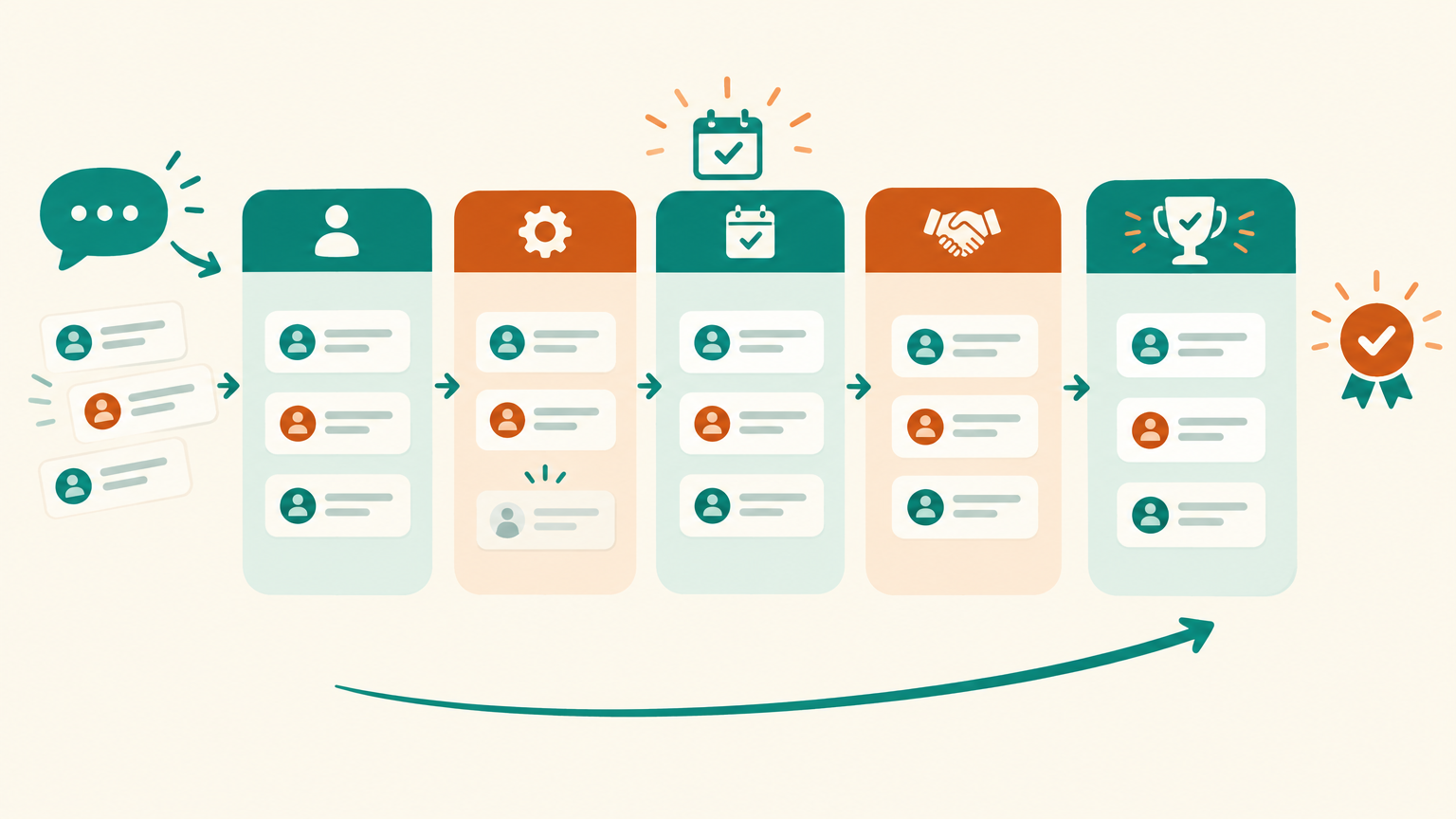
Most service businesses do not lose leads because nobody wanted to buy. They lose them in the gaps: an inquiry that got a reply but no next step, a call that went well but no proposal followed, a proposal that went out and was never chased. Without clear pipeline stages, nobody can see where those gaps are, and automation only moves the confusion faster.
This guide is for coaches, consultants, agencies, clinics and other service businesses that sell through conversations and calls. You will get six pipeline stages that fit most service sales, a written exit rule for each one, where automation belongs and where a person must stay, a copy-ready stage map, and the three numbers that tell you whether the pipeline is healthy.
What you will get
- The difference between a stage and a status, and why it matters.
- Six stages that fit most service businesses.
- An exit rule for every stage, so moves are never a guess.
- Where automation fits at each stage, and where a person must stay.
- A copy-ready stage automation map.
- The three pipeline numbers to review every week.
1. Stages, statuses and pipelines
Three words get mixed up, and the mix-up causes most messy CRMs:
- Pipeline: the ordered series of steps a potential sale moves through. One business can have more than one, for example one for new clients and one for renewals.
- Stage: where a deal is in that series. A stage describes the buyer's progress, not your to-do list. “Call booked” is a stage; “send Maria the PDF” is a task.
- Status: whether the deal is still alive. In GoHighLevel, every opportunity carries one of four statuses: Open, Won, Lost or Abandoned, separate from its stage. For reference, check the documentation here.
Other CRMs model the same idea differently. HubSpot treats Closed won and Closed lost as stages and asks you to keep both in every deal pipeline so reporting works. For reference, check the documentation here. Whichever tool you use, the principle holds: stages show progress, and the end of the line must always record a clear win or loss.
2. Six stages for a service business
Service sales usually run through a conversation, a call and a proposal. These six stages cover that path without turning the board into a wall of columns.
| Stage | What it means | Typical owner |
|---|---|---|
| 1. New inquiry | Someone asked about your service through chat, a form, email or a call | Chatbot or front desk |
| 2. Qualified | They fit your service, have a real need and a realistic budget or timeline | Chatbot questions, checked by a person when unclear |
| 3. Call booked | A discovery call or consultation is on the calendar | Booking link and reminders |
| 4. Proposal sent | A written scope and price has been sent after the call | The person who ran the call |
| 5. Decision | The proposal is with the buyer; you are answering questions and following up | Follow-up sequence plus the owner |
| 6. Won or Lost | Paid or signed off, or a clear no, with the reason recorded | The owner |
Six is not a magic number. A clinic might merge stages 4 and 5 because the price is fixed; an agency with long sales cycles might add a “Proposal review meeting” stage. Add a stage only when something different happens there, and someone different does it.
3. Give every stage an exit rule
A stage is only useful if everyone moves deals the same way. The fix is an exit rule: one sentence that says what must be true before a deal leaves the stage.
Write every stage as a rule a stranger could check. If two people on your team would put the same lead in different stages, the stage is not defined yet, and no automation should depend on it.
- New inquiry → Qualified: the three qualifying answers are recorded (service needed, timeline, budget range or decision maker).
- Qualified → Call booked: a call exists on the calendar with a date, time and confirmed contact details.
- Call booked → Proposal sent: the call happened, notes are saved, and the proposal has left your outbox.
- Proposal sent → Decision: the buyer has acknowledged the proposal or the first follow-up has gone out.
- Decision → Won: deposit paid or written approval received. Decision → Lost: a clear no, with a lost reason selected.
Most CRMs can enforce part of this for you. HubSpot can show or require specific properties when a deal moves into a stage, so a deal cannot reach “Proposal sent” without a proposal value, for example. For reference, check the documentation here. Required fields are the cheapest data-quality tool you have.
4. Where automation fits, and where a person must stay
Automation works best on steps that are frequent, predictable and time-sensitive. Judgment, pricing and relationships stay with people.
- New inquiry: a chatbot replies in seconds, creates the record, tags the source and the service asked about, and puts the deal in stage 1. The method is in how to qualify leads in Messenger automatically.
- Qualified: the same conversation asks the qualifying questions and moves the deal when the exit rule is met. Unclear answers go to a person, using the triggers in the handoff playbook.
- Call booked: the booking link, confirmation and reminders are fully automatable, and the stage can move on its own when the booking is created.
- Proposal sent: a person writes it. Automation only reminds the owner if the proposal has not gone out within your agreed time.
- Decision: a short, polite follow-up sequence, paused the moment the buyer replies. The pattern is in how to automate lead follow-up with AI.
- Won or Lost: won triggers onboarding; lost triggers a short request for the reason and, if the buyer agrees, a place in your newsletter.
In GoHighLevel, workflows can start when an opportunity is created, moves stages or changes status, which is how each of these steps gets wired to the board. For reference, check the documentation here.
5. A copy-ready stage automation map
Fill this in before you build anything. It becomes the spec for your CRM setup, and the checklist you test against.
PIPELINE: New clients            OWNER: ________   REVIEWED: ____

STAGE 1  NEW INQUIRY
  Enters when: a new chat, form, email or call arrives
  Exit rule:   3 qualifying answers recorded
  Automation:  instant reply, create record, tag source + service
  Person:      none, unless the bot cannot place the lead

STAGE 2  QUALIFIED
  Exit rule:   call booked on the calendar
  Automation:  send booking link; 1 reminder after 24 hours
  Person:      review unclear or high-value leads the same day

STAGE 3  CALL BOOKED
  Exit rule:   call held, notes saved, proposal sent
  Automation:  confirmation + reminders before the call
  Person:      runs the discovery call

STAGE 4  PROPOSAL SENT
  Exit rule:   buyer acknowledged or first follow-up sent
  Automation:  remind the owner if no proposal in 2 working days
  Person:      writes scope and price

STAGE 5  DECISION
  Exit rule:   paid / approved (Won) or clear no (Lost)
  Automation:  follow-ups, paused when the buyer replies
  Person:      answers questions and objections

STAGE 6  WON or LOST
  Won:   onboarding message, welcome call booked
  Lost:  lost reason required; newsletter invite if they agree

STALL ALERT: any deal in one stage longer than ___ days
The timings above are placeholders, not benchmarks. Set them from how your buyers actually behave, and adjust after a month of data.
6. Lost, abandoned and why it matters
A pipeline full of deals that will never close hides the ones that still can. Close deals out honestly, and record why.
- Lost means the buyer said no or chose someone else. GoHighLevel describes it as the lead choosing not to proceed or going with a competitor.
- Abandoned means nobody is following up any more. It is often a sign of a gap in your process, not a decision by the buyer.
Use a short, fixed list of lost reasons, for example: price, timing, chose another provider, not a fit, no response. Free-text reasons cannot be counted. After a quarter, the list tells you whether to change your offer, your qualifying questions or your follow-up.
Do not let automation mark deals as lost on its own because of silence. Move them to a “No response” reason only after the last follow-up, and let a person confirm high-value deals.
7. Measure the pipeline
Three numbers, reviewed weekly, tell you where the pipeline leaks:
| Number | How to calculate it | What it tells you |
|---|---|---|
| Stage conversion rate | Deals that moved to the next stage, divided by deals that entered the stage | Which step loses the most buyers |
| Time in stage | Median days a deal spends in each stage | Where deals wait on you, not on the buyer |
| Stalled deals | Open deals past your stall limit | Who needs a follow-up today |
Illustrative example (every figure here is invented to show the math): 100 new inquiries in a month, 40 qualified, 25 calls booked, 15 proposals sent and 9 won. The step conversions are 40%, 63%, 60% and 60%. The biggest drop is inquiry to qualified, so the first fix is the qualifying conversation or the lead source, not the proposal.
If your CRM supports stage probabilities, it can also show a weighted pipeline: the value in each stage multiplied by the chance deals there close. HubSpot calculates this from each stage's probability. Treat it as a planning aid, and update the probabilities from your own won and lost history.
Acceptance criteria before you switch on stage automation:
- Every stage has a written exit rule and an owner.
- A test lead walks through all six stages and every automation fires once, in the right order.
- A test reply during the Decision stage pauses the follow-up sequence.
- Moving a deal to Lost cannot be saved without a lost reason.
- The stall alert reaches the right person for a deal past its limit.
8. Common mistakes
- Too many stages. If two columns always move together, merge them.
- Stages named after tasks. “Send email” is a task. Stages describe the buyer's progress.
- No lost reasons. Without them, you cannot learn from the deals you did not win.
- Automating before the rules exist. Automation copies whatever process you have, including the broken parts. Start with don't automate chaos.
- Nobody owns the board. One named person reviews stalled deals every week.
An honest limitation: a clean pipeline shows you where deals stall, not why buyers hesitate. Stage data points you to the right conversation; it does not replace reading the conversations, listening to the calls and asking lost buyers what would have changed their mind.
Frequently asked questions
How many stages should a sales pipeline have for a service business?
Most service businesses work well with five to seven stages. Six common ones are new inquiry, qualified, call booked, proposal sent, decision, and won or lost. Add a stage only when different work happens there.
What is the difference between a pipeline stage and a status?
A stage shows where a deal is in your sales process. A status shows whether it is still alive, for example open, won, lost or abandoned. Some CRMs combine the two by using won and lost as final stages.
Which pipeline stages can be automated?
The first reply, tagging, qualifying questions, booking, reminders and follow-ups are good candidates. Discovery calls, proposals, pricing and the decision to close a high-value deal as lost should stay with a person.
What should I measure in my sales pipeline?
Track stage conversion rate, median time in each stage and the number of stalled deals every week. Together they show where buyers drop out and where deals are waiting on your team.
Build a pipeline that moves on its own
Want your stages, exit rules and stage automations designed and set up for your team? Book a free AI Automation Blueprint call.
Building it yourself? GoHighLevel combines pipelines, workflows and booking in one place (affiliate link: I may earn a commission at no extra cost to you).
Prefer to learn it step by step? Join the free weekly newsletter.
References
- HighLevel Support: Understanding Opportunities in HighLevel (opportunities, pipelines, stages, statuses and workflow triggers). Accessed October 2026.
- HubSpot Knowledge Base: Set up and customize pipelines (deal stages, probabilities, won and lost stages, conditional stage properties). Accessed October 2026.
- How to Automate Lead Follow-Up With AI (Without Sounding Like a Robot), Dijae Dadula.
Keep reading
Get one practical idea like this every week
Join the free newsletter on AI agents, automation and turning your skills into income. Prefer video? Watch the walkthroughs on YouTube.
Want a system like this built for your business? Book a free AI Automation Blueprint call, or see the done-for-you services at my consultancy, IRD Digital Marketing Services.
DIJAE DADULA
Dijae Dadula · AI automation and systems specialist · Cavite, Philippines · Founder of IRD Digital Marketing Services
Home · Blog · Book a call · Newsletter · YouTube · Threads · Transparency
Some links on this site are affiliate links. If you buy through them, I may earn a commission at no extra cost to you.
© 2026 Dijae Dadula. All rights reserved.
