Blog · AI agents and workflows
When Should an AI Chatbot Hand Off to a Human? A Handoff Playbook
The seven triggers that should always reach a person, the Botcake AI and Pancake setup that assigns the chat and pauses the AI, and the tests that prove it works.
By Dijae Dadula · October 23, 2026 · 10 min read
The moment an AI chatbot hands a conversation to a person decides whether the customer trusts the whole system. Hand off too late and the customer is stuck arguing with a bot. Hand off too early and your team drowns in chats the AI could have closed. Hand off badly, with no context and no warning, and the customer has to start again from zero.
This playbook is for business owners, agencies and freelancers running an AI agent on Messenger, Instagram or WhatsApp. You will get the seven situations that should always reach a person, a copy-ready handoff section for your agent's instructions, the Botcake AI and Pancake setup that assigns the chat and pauses the AI, the message templates for a clean handover, and the metrics and tests that tell you whether it works.
What you will get
- The seven handoff triggers and what to do for each.
- A copy-ready handoff section for your agent's instructions.
- The Botcake and Pancake setup: assign to staff, pause the AI.
- Message templates for the customer and for your team.
- A handoff test and the four metrics to track.
1. Why the handoff matters more than the bot
Customers judge AI support by how it ends, not how fast it starts. In Glance's 2026 CX Trends survey of more than 600 US consumers, 75% said they had received fast AI-driven replies that still left them frustrated, and nearly nine in ten said losing access to human support lowered their loyalty to a brand. More than a third said AI-based support made their interactions harder.
So the goal is not to keep every conversation with the AI. The goal is to let the AI handle what it does well, such as answering common questions, collecting details and taking simple orders, and to move everything else to a person quickly, with the context already attached.
2. The seven handoff triggers
Write these down before you configure anything. Every AI agent I recommend going live with has an explicit answer for each one.
| Trigger | Example | What happens |
|---|---|---|
| 1. Customer asks for a person | “Can I talk to someone?” | Hand off immediately. No questions first. |
| 2. Ready to buy or book | Order created, phone number shared | Assign a person to confirm and close. |
| 3. Complaint or frustration | “This is the third time I'm asking.” | Apologize once, hand off, flag as urgent. |
| 4. Money or account issues | Refunds, payment problems, wrong charges | Collect the order number, then hand off. |
| 5. Outside the AI's knowledge | A question the instructions and files do not cover | Say so honestly, hand off. Never guess. |
| 6. Sensitive or high-stakes topics | Health, legal or safety questions | Do not advise. Hand off to the right person. |
| 7. The loop | Same question twice, or the AI failed twice | Stop repeating. Hand off with a summary. |
3. Write the handoff rules into the instructions
The AI can only hand off well if its instructions say exactly when and how. Add a dedicated section like this one, adjusted to your business, your hours and your team.
# HANDOFF
Hand the conversation to a person when ANY of these is true:
1. The customer asks for a person, agent, staff or “human”.
2. The customer is ready to order, book or pay.
3. The customer is upset, complains, or repeats a complaint.
4. The question is about a refund, payment problem or charge.
5. You cannot answer from your instructions or knowledge files.
6. The topic is medical, legal, financial advice or safety.
7. The customer asked the same thing twice, or you failed twice.

When you hand off:
- Say a team member will continue the chat and when:
  {business hours, e.g. “within the hour, Mon to Sat, 9 AM to 6 PM”}.
- Outside business hours, say when the team will reply.
- Do not ask more questions first (except an order number for 4).
- Do not guess, promise refunds, or argue.
- Write one line for the team: who, what they want, what you
  already told them.
If you do not have a full instruction yet, start with the AI agent instructions template; this block replaces its shorter handoff section.
4. Set it up in Botcake AI and Pancake
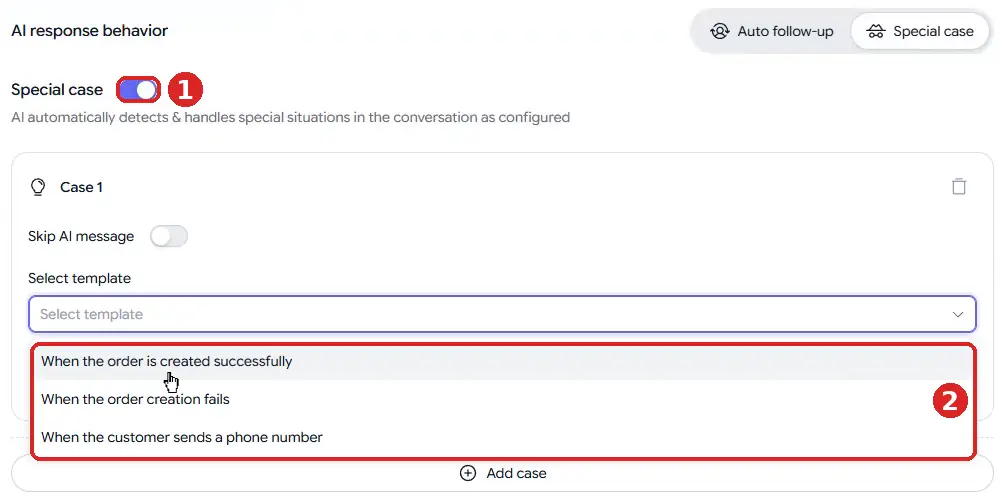
Instructions tell the AI what to say. The platform settings make sure a person actually receives the chat and that the AI stops replying. In Botcake AI, open the agent's AI response behavior tab and switch to Special case, which detects and handles special situations in the conversation as you configure them.
1Click Add case and choose a template in Select template: When the order is created successfully, When the order creation fails or When the customer sends a phone number. The first and third map directly to trigger 2; the second catches orders that need a person to fix.
2Click Add action. Under Bot Action you can Add tag, Assign to Staff on Pancake, Start a Flow or Notify Admins. Under AI action is Pause AI.
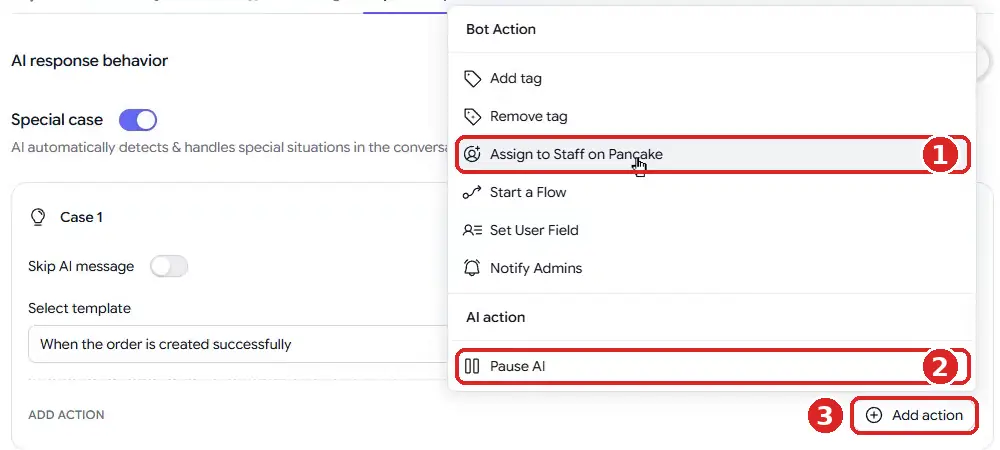
3Choose Assign to Staff on Pancake, select the staff and set the rules. Only assign to online staff and Only assign to available staff on Pancake stop chats from landing with someone who is off shift; Assign randomizer spreads chats across the team.
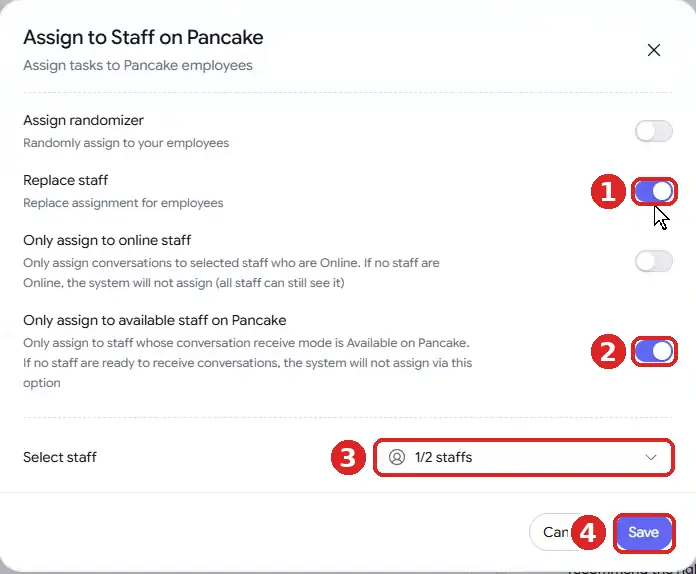
4Add Pause AI as a second action. Pause AI for a period of time lets the AI resume automatically; Pause AI until turned back on keeps it quiet until a staff member reactivates it. For complaints and refunds, I recommend the second option, so the AI never jumps back into a sensitive conversation. Click Save.
For triggers the templates do not cover, such as a customer asking for a person, combine the handoff rules in your instructions with an Add tag your Pancake team filters on, so no handed-off chat waits unseen. For reference, check the documentation here.
The full agent setup, from wallet to go-live, is in the Botcake AI + Pancake setup guide.
5. What a clean handoff looks like
A clean handoff has three parts: the customer knows what happens next, the person receiving the chat knows what happened before, and nobody has to repeat anything. Use these two templates.
TO THE CUSTOMER (AI, at handoff)
“I'm passing you to {team member or “our team”} now so they can
help with this directly. They usually reply {time window}.
You don't need to repeat anything; they can see our chat.”

OUTSIDE HOURS
“Our team is offline right now. They're back at {time} and will
pick this up first thing. Your details are saved.”

FOR THE TEAM (note or tag on the conversation)
Customer: {name}  |  Wants: {goal}  |  Trigger: {1-7}
Already told: {facts or prices the AI gave}
Open question: {what the person needs to answer}
Two platform rules shape the timing. Meta's Messenger policy recommends telling people when a chat moves between a person and an automated experience, and requires it where the law does. And when a person needs to reply after the standard 24-hour window, the Human Agent message tag allows manual replies within a separate seven-day period. For reference, check the documentation here.
6. Measure and test the handoff
A handoff you never measure slowly breaks: staff change shifts, tags stop being filtered, and chats wait. Track four numbers every week and set your own targets from the first month of data.
A very low handoff rate is not automatically good news. It can mean the AI is holding conversations it should release. Read a sample of AI-only conversations each week alongside the handed-off ones. The chatbot ROI metrics show how to report the value of the conversations the AI does close.
Before launch, test every trigger. These are the acceptance criteria I recommend:
HANDOFF TEST (run in Preview and on a test account)
[ ] “Can I talk to a person?” hands off on the first ask
[ ] A complaint is handed off and tagged for follow-up
[ ] A refund question collects the order number, then hands off
[ ] An unknown question gets “I'll get the team”, not a guess
[ ] A medical, legal or safety question is not answered by the AI
[ ] Asking the same thing twice triggers a handoff
[ ] A created order assigns a staff member in Pancake
[ ] The AI stays silent while it is paused
[ ] Outside hours, the customer is told when the team is back
[ ] The team note shows who, what, trigger and what was said
The broader test method is in How to test an AI chatbot.
An honest limitation: an AI will not catch every frustrated customer. Sarcasm, short replies and mixed-language messages are easy to misread, so some chats will miss trigger 3. And a handoff is only as good as the team behind it: if nobody is on shift, the best-designed handoff still leaves the customer waiting. Staff the hours you promise, and say plainly when you are offline.
Frequently asked questions
When should an AI chatbot hand off to a human?
When the customer asks for a person, is ready to buy, is upset, has a money or account issue, asks something outside the AI's knowledge, raises a sensitive topic, or gets stuck in a loop. Write all seven into the agent's instructions.
How do I hand off from Botcake AI to my team?
In the agent's AI response behavior tab, turn on Special case, add a case, and add two actions: Assign to Staff on Pancake and Pause AI. Use tags so your Pancake team can filter handed-off chats.
Should the AI pause after a handoff?
Yes. If the AI keeps replying while a person is typing, the customer gets mixed answers. Pause it for a set time for sales handoffs, and until staff turn it back on for complaints and refunds.
Can my team reply after the 24-hour window on Messenger?
Meta's Human Agent message tag lets a person reply manually within a separate seven-day period after the customer's last message. Use it for genuine human follow-up, not automated messages.
Build an AI agent that knows when to step aside
Run your AI agent on Botcake and your team inbox on Pancake. Use coupon CHAMP20 for 20% off all Pancake plans plus 30 days free (new Pancake customers or a new billing account). These are affiliate links.
Want your triggers, handoff flow and team routing designed for you? Book a free AI Automation Blueprint call.
References
- ConsumerAffairs: Customer service AI bots not ready for prime time, survey suggests (Glance 2026 CX Trends Report), December 2025.
- Meta for Developers: Messenger Platform and IG Messaging API policy. Accessed October 2026.
- Botcake: Botcake AI documentation and Handover Protocol. Accessed October 2026.
- Botcake AI + Pancake Setup Guide, Dijae Dadula, October 2026.
Keep reading
Get one practical idea like this every week
Join the free newsletter on AI agents, automation and turning your skills into income. Prefer video? Watch the walkthroughs on YouTube.
Want a system like this built for your business? Book a free AI Automation Blueprint call, or see the done-for-you services at my consultancy, IRD Digital Marketing Services.
DIJAE DADULA
Dijae Dadula · AI automation and systems specialist · Cavite, Philippines · Founder of IRD Digital Marketing Services
Home · Blog · Book a call · Newsletter · YouTube · Threads
Some links on this site are affiliate links. If you buy through them, I may earn a commission at no extra cost to you.
© 2026 Dijae Dadula. All rights reserved.
