Blog · CRM and automation that sells
How to Stop Bogus COD Orders and Returned Parcels With Chat Automation
Most returned parcels start in the chat. Here is how to confirm every COD order, block repeat bogus buyers in Botcake and Pancake, and keep a person on risky orders.
By Dijae Dadula · October 21, 2026 · 11 min read
Every Philippine online seller knows the parcel that comes back. The buyer ordered on Messenger, gave a name and an address, and then was not home, changed their mind, or never meant to buy at all. You paid for the packaging, the shipping and the staff time, and the stock sat on a truck for a week instead of on your shelf.
This guide is for sellers who take cash-on-delivery (COD) orders through chat. You will get the main reasons parcels are returned to sender (RTS), a simple way to cost one returned parcel, and a chat automation setup in Botcake AI and Pancake that confirms orders, blocks known bogus buyers and keeps a person in charge of risky orders.
What you will get
- The five main reasons COD parcels come back, and which ones chat can prevent.
- A cost-per-RTS calculator you can fill in with your own numbers.
- A confirm-before-ship flow with copy-ready messages.
- The Botcake and Pancake settings that block repeat bogus buyers.
- A launch checklist and the two metrics to track every week.
1. Why COD parcels come back
COD is not going away. About 23% of Philippine e-commerce value on Xendit's platform is still paid in cash on delivery, even as QR Ph and InstaPay payments grew 198% from January 2025 to April 2026. For many buyers, paying the rider is the only way they will order from a page they do not know yet.
Ninja Van lists the five most common reasons parcels are returned to sender in the Philippines:
| RTS reason | Can chat prevent it? |
|---|---|
| Incomplete or wrong address | Yes. Confirm the full address, landmark and barangay before you book the courier. |
| Nobody home to receive | Mostly. Confirm who receives and send a heads-up when the parcel ships. |
| Buyer changed their mind or refused | Partly. A clear order summary, total and delivery time removes impulse and surprise. |
| Defective or damaged package | No. That is packing and courier handling. |
| Wrong item inside | Partly. A confirmed order summary gives the packer one source of truth. |
Three of the five start in the conversation, before a single box is packed. That is where automation earns its keep: not by replying faster, but by making sure every order that leaves your shop is complete, confirmed and wanted.
2. What one returned parcel really costs
Sellers often price an RTS as “the shipping fee.” It is more than that. Add up these lines for one returned parcel:
Cost of one RTS =
    outbound shipping fee
  + return fee (if your courier charges one; check your agreement)
  + packaging and insert materials
  + staff time to pack, follow up and restock
  + margin lost on stock tied up or damaged in transit

Monthly RTS cost = cost of one RTS x number of RTS parcelsImagine a page that ships 600 COD orders a month with a 10% RTS rate. That is 60 parcels coming back. At the illustrative ₱245 each, the page loses ₱14,700 a month before counting the buyers who never ordered again. Cutting RTS from 10% to 6% saves 24 parcels, or ₱5,880 a month in this example. Do this math with your own numbers before you buy any tool, because it tells you what a fix is worth.
3. Confirm by chat before you ship
The single most effective habit is an order confirmation in the same chat where the buyer ordered. Ninja Van recommends confirming buyer details by call or chat and sending a delivery schedule confirmation. Chat automation makes that consistent, every order, every day, without someone remembering to do it.
Add this to your AI agent's instructions so every order ends with the same confirmation. Adjust the wording to your brand, but keep the structure.
ORDER CONFIRMATION (add to your agent instructions)
Before an order is created, collect: product and variant,
quantity, full name, mobile number, complete address
(house number, street, barangay, city, province, landmark).
If any item is missing or unclear, ask for it. Never guess.

Then send exactly one summary and wait for a reply:
“Here is your order:
 {product} x {qty}
 Total to pay the rider: {total} (cash on delivery)
 Deliver to: {name}, {mobile}, {address}
 Expected delivery: {delivery window}
 Reply YES to confirm, or tell me what to change.”

Only treat a clear YES as confirmation.
Do not promise delivery dates the courier has not given.
The summary does three jobs at once. It catches address errors while the buyer is still in the chat, it states the cash amount so there is no surprise at the door, and it gives your packer one confirmed record to pack from. If your agent is new, the AI agent instructions template shows where this block fits.
4. Block repeat bogus buyers automatically
Some returns are honest mistakes. Others come from the same people again and again. If you run your inbox on Pancake and your AI agent on Botcake AI, connect the two so the agent creates orders in Pancake POS and skips customers who already have negative reports.
- Open your agent in Botcake AI and go to the Tools tab.
- Under Integrate connection, click Pancake POS to open Automation create order.
- Turn on Auto-create order when information is available, so orders are only created once the details are complete.
- Turn on Stop auto-creating orders when receiving negative reports on Pancake.
- Set Import product to Import all, so the agent quotes real names and prices from your POS.
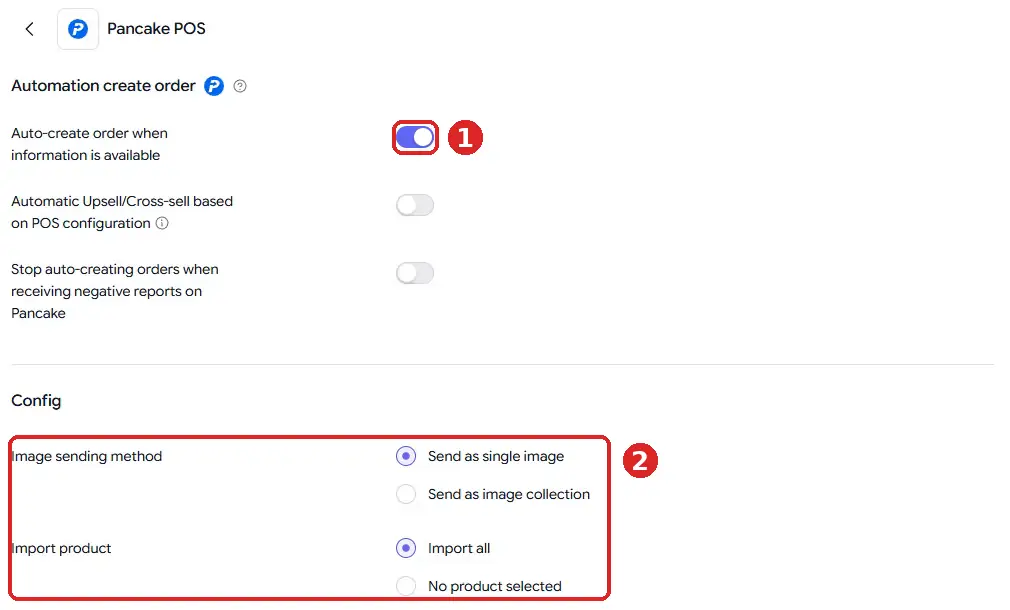
With that switch on, a flagged customer can still chat and ask questions, but the agent will not push an order straight into your system. That is the right balance: you do not insult a buyer who may have a good reason for a past return, and you do not ship blind either. For reference, check the documentation here. The full setup, step by step, is in the Botcake AI + Pancake setup guide.
5. Put a person on risky orders
Automation should decide which orders are routine, and a person should decide the rest. In Botcake AI, open AI response behavior, switch to Special case and click Add case. Choose the template When the order is created successfully, then add two actions: Assign to Staff on Pancake and the AI action Pause AI.
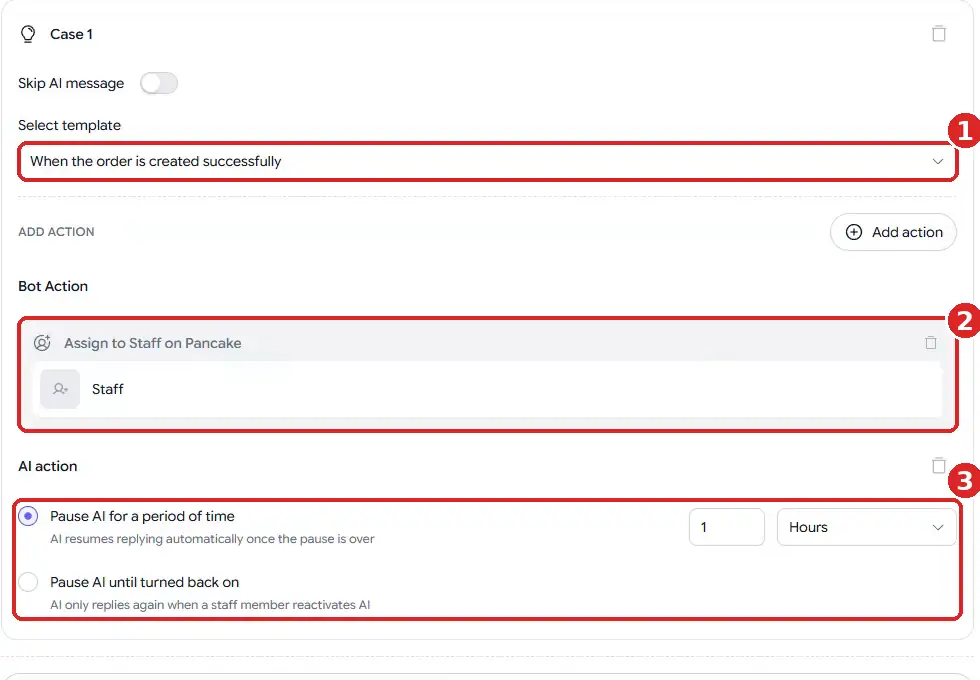
Now a person sees every new order while the buyer is still warm. They can confirm high-value orders by phone, ask a first-time buyer one extra question, or call when the address looks thin. I recommend writing the rule down for the team, so every staff member treats risk the same way:
| Order looks like | What the team does |
|---|---|
| Repeat buyer, confirmed YES, full address | Pack and ship. |
| First-time buyer, high order value | Call or voice-message to confirm before packing. |
| Address missing landmark or barangay | Ask once in chat; hold until complete. |
| Negative report on Pancake | Offer prepaid payment or a deposit; do not ship COD. |
| No reply to the summary within a day | One follow-up, then close the order as unconfirmed. |
6. Reduce how much rides on COD
You do not have to remove COD to lower the risk. Ninja Van suggests capping the COD amount and asking for e-wallet or gateway payment above that cap, sometimes with a small incentive such as a freebie or free shipping. With QR Ph and InstaPay now about 13% of e-commerce value on Xendit's platform, many buyers already have a prepaid option in their pocket.
- Set a COD ceiling. Above a total you choose, the agent offers prepaid payment only.
- Reward prepaid. A small freebie or free shipping for prepaid orders changes behavior without forcing anyone.
- Ask for a deposit on made-to-order or very high-value items.
- Keep COD for repeat buyers who have received and paid before.
Put these rules in the agent's instructions in plain words, so the AI explains them politely and the same way every time. Buyers accept a clear policy far more easily than a staff member deciding case by case.
7. Messages after the order
A short update when the parcel ships, with the expected delivery window and the cash amount, gives the buyer time to arrange for someone to be home. Plan these messages around Meta's rules. Standard replies are allowed within 24 hours of the buyer's last message. After that, order and shipping updates go through Messenger utility messages, which use approved templates for order and account updates and must not contain marketing.
The old message tags for this are gone. Since April 27, 2026, requests using the POST_PURCHASE_UPDATE, CONFIRMED_EVENT_UPDATE and ACCOUNT_UPDATE tags are rejected, and Meta points businesses to utility templates or the Marketing Messages API instead. For reference, check the documentation here. If your shipping updates still rely on an old tag, retest them now.
8. Launch checklist and metrics
Before you switch this on for every order, test it like any other system. These are the acceptance criteria I recommend:
COD ORDER AUTOMATION: LAUNCH CHECK
[ ] Agent asks for every missing field, never invents an address
[ ] Summary shows item, quantity, total, address, delivery window
[ ] Only a clear YES creates the order; “maybe” or silence does not
[ ] Negative-report stop is on and tested with a flagged test contact
[ ] New orders are assigned to a staff member on Pancake
[ ] AI pauses after an order so staff and AI do not both reply
[ ] COD ceiling and prepaid offer explained the same way every time
[ ] Shipping update uses an approved utility template, no promo
[ ] Tested on 20+ real order conversations from your own history
After launch, track two numbers every week:
- RTS rate = returned parcels / parcels shipped. This is the outcome.
- Confirmation rate = orders with a clear YES / orders collected. If it drops, your summary is unclear or your follow-up is too slow.
Compare the RTS rate with the four weeks before launch. If it does not move after a month, look at the RTS reasons from your courier report: if most returns are damaged or wrong items, the fix is in packing, not in chat. How to test an AI chatbot covers the test method in detail, and the chatbot ROI metrics show how to report the savings.
An honest limitation: no setup brings RTS to zero. Negative reports only help with buyers who have already been reported, a confirmed YES does not guarantee the cash is ready at the door, and some returns come from courier handling you do not control. Expect fewer returns, not none, and keep a person reviewing the flagged orders.
Frequently asked questions
What is RTS in COD selling?
RTS means return to sender: the courier could not complete the delivery, so the parcel comes back to the seller. Common causes are a wrong or incomplete address, nobody home to receive, and a buyer who refuses the parcel.
How do I stop bogus buyers on Facebook Messenger?
Confirm every order in the chat with a full summary and a clear YES, block automatic orders for customers with negative reports on Pancake, and have a person review first-time, high-value or flagged orders before anything ships.
Should I stop offering cash on delivery?
For most Philippine sellers, no. COD is still about 23% of e-commerce value on Xendit's platform. Cap the COD amount, reward prepaid payment, and keep COD for buyers with a clean record instead.
Can I send shipping updates after 24 hours on Messenger?
Yes, through Messenger utility messages, which use approved templates for order and account updates. They must not contain marketing, and the old post-purchase message tags no longer work.
Set up order confirmation that protects your margin
Run your AI agent on Botcake and your team inbox and orders on Pancake. Use coupon CHAMP20 for 20% off all Pancake plans plus 30 days free (new Pancake customers or a new billing account). These are affiliate links.
Want the confirmation flow and risk rules built for your shop? Book a free AI Automation Blueprint call.
References
- Ninja Van Philippines: Top RTS reasons and how to avoid them, November 2022.
- GMA News: QR Ph, InstaPay payments nearly triple on Xendit platform (Xendit Ecommerce Payments Momentum Report), October 15, 2026.
- Meta for Developers: Send a utility message. Accessed October 2026.
- Meta for Developers: Messenger Platform changelog (message tag deprecation, March 27, 2026).
- Botcake: Guide to setting up auto order creation with Botcake AI. Accessed October 2026.
- Botcake AI + Pancake Setup Guide, Dijae Dadula, October 2026.
Keep reading
Get one practical idea like this every week
Join the free newsletter on AI agents, automation and turning your skills into income. Prefer video? Watch the walkthroughs on YouTube.
Want a system like this built for your business? Book a free AI Automation Blueprint call, or see the done-for-you services at my consultancy, IRD Digital Marketing Services.
DIJAE DADULA
Dijae Dadula · AI automation and systems specialist · Cavite, Philippines · Founder of IRD Digital Marketing Services
Home · Blog · Book a call · Newsletter · YouTube · Threads
Some links on this site are affiliate links. If you buy through them, I may earn a commission at no extra cost to you.
© 2026 Dijae Dadula. All rights reserved.
