Blog · CRM and automation that sells
Chatbot Conversation Design That Converts: Openers, Quick Replies and Follow-Ups
How to write the first message, offer the right taps and follow up inside Messenger's rules, with copy-ready scripts, two sketches and a test checklist.
By Dijae Dadula · November 3, 2026 · 11 min read
Someone taps “Send message” on your Facebook ad. The bot answers in one second: “Hi! How can I help you?” Then nothing. The customer stares at an empty text box, is not sure what to type, and goes back to scrolling. The bot was fast. It just gave them nothing to do.
Chatbot conversation design means deciding what the bot says, which taps it offers and when it follows up, so every message moves the customer one step closer to a decision.
This guide is for business owners, marketers and agencies running a chatbot on Messenger or Instagram, usually with Botcake or ManyChat (affiliate links). You will get a copy-ready opener, rules for quick replies, follow-ups that respect Meta's rules and a short test to prove it works.
What should a chatbot's first message say?
Short answer: who is talking, what it can do right now, and two to four taps for the most common reasons people message you.
“How can I help you?” feels polite, but it hands the hardest job to the customer: working out what to ask and how to phrase it. A good opener does that work for them. It names the assistant honestly (Meta's policy requires automated chats to say so where the law requires it, and recommends it everywhere), lists what it can do in one line, and offers taps that match the top reasons people message your page. One tap is always a way to reach a person.
Where do the taps come from? Your own inbox. Read the last 50 to 100 first messages on your page and group them. For most shops it is price, stock and delivery. For clinics it is booking and prices. For service businesses it is “how much” and “can you do this for me”. Those groups become your taps.
Here is an opener you can adapt. Every line is a template, not a real conversation:
Hi {first_name}, I'm the {business} assistant.
I can check prices and stock, book a visit, or connect you with our team.
What would you like to do?

[Prices and stock]  [Book a visit]  [Talk to a person]
How many quick replies should you offer?
Short answer: three to five, with short labels, even though Messenger allows more.
Messenger allows up to 13 quick replies on one message, and a text quick reply title can be up to 20 characters. Quick replies are also temporary: they disappear when the customer taps one and after the next message, so they suit one-time choices, not menus people return to. For reference, check the documentation here.
The limit is not the target. On a phone, five chips already wrap into rows, and every extra option is one more thing to read before the customer can act. Keep labels to two or three words, start with a verb or a noun the customer would use (“Prices”, “Book a visit”), and keep “Talk to a person” in the set.
More options make the bot more helpful.
More options make the first step harder. Cover the top reasons people message you, and let free text and a person handle the rest.
Quick reply, button or free text: which one when?
Short answer: quick replies for one-time choices, buttons for actions people may come back to, free text when the answer cannot fit in a tap.
| Use | When | Example |
|---|---|---|
| Quick replies | A single choice that moves the conversation forward | “Which branch is closest to you?” |
| Buttons | An action that should stay visible on the message (a link, a call, a booking page) | “See the price list”, “Call us” |
| Free text | Details that vary for every customer, or anything an AI agent should read in the customer's own words | “Describe the problem with your unit” |
| Input fields | A value you want to save to the contact record | Phone number, email, preferred date |
If an AI agent handles the conversation, free text stops being a dead end, because the agent can read the customer's own words. Taps still matter: they are faster for the customer and they give the agent a clean signal of intent. The voice of those replies is its own topic, covered in how to make your chatbot sound human.
How many questions should a bot ask before the offer?
Short answer: only the questions your team needs to act, usually two or three, asked one at a time.
Every question should earn its place by changing what happens next: which product, which branch, how soon. If the answer would not change the reply or the routing, cut the question. Ask one thing per message, explain why when it is not obvious (“so I can check stock at the nearest branch”), and give the customer something useful right after they answer. The full method for scoring and routing those answers is in how to qualify leads in Messenger automatically.
How do you follow up without annoying people?
Short answer: one or two useful nudges inside the 24-hour window, each with a new reason to reply, and stop the moment the customer answers.
On Messenger, a business can reply freely, promotions included, for 24 hours after the customer's last message. When the customer's first message comes from a Click-to-Messenger ad, that window can last up to 7 days. Outside the window, the rules changed in 2026: since April 27, 2026, Messenger rejects the POST_PURCHASE_UPDATE, CONFIRMED_EVENT_UPDATE and ACCOUNT_UPDATE message tags with error code 100. The only tag left is HUMAN_AGENT, which lets a real person reply by hand within 7 days, with no promotional content. For reference, check the documentation here and the changelog here.
What you can still send after 24 hours
| Option | What it is for | Watch out for |
|---|---|---|
| Standard window | Anything, including offers, within 24 hours of the customer's last message (up to 7 days after a Click-to-Messenger ad) | Every bot follow-up should live here |
| HUMAN_AGENT tag | A real person answering a support case by hand, up to 7 days later | No promotions, no automation |
| Utility messages | Pre-approved templates for order, account and appointment updates | No marketing content; Meta's replacement for the retired tags |
| Marketing messages | Promotions to people who opted in | Paid campaigns through an ad account, with frequency caps enforced since April 2026 |
| Sponsored messages | A paid ad sent to people who messaged your Page before | Labelled “Sponsored”, follows ad policies, not available on Instagram |
Utility messages matter most for shops. Meta opened them in beta on July 29, 2025, with the Philippines among the first markets, and has since added images (September 2025) and named fields in templates (March 2026). If your bot platform still sends order or shipping notices with the old tags, those messages now fail. Check whether your platform supports utility templates yet; if it does not, send those updates inside the 24-hour window instead.
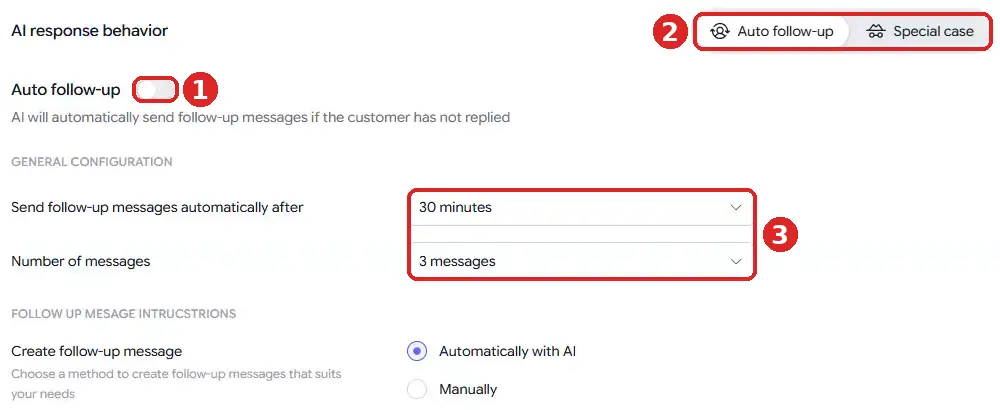
So design your follow-ups to work inside the window. In Botcake AI, the agent's AI response behavior tab has an Auto follow-up switch that sends follow-ups when the customer has not replied, with a delay (“Send follow-up messages automatically after”) and a cap (“Number of messages”). You can let the AI write them or write them yourself. For flow-based bots, tag-based sequences do the same job: attach a sequence when a tag is added and remove it when the customer replies. For reference, check the documentation here.
What makes a follow-up welcome is the reason it gives. “Just checking in” adds nothing. An illustrative nudge like “The size you asked about is back in stock” or “Here is the price list you asked for” gives the customer a reason to answer. Each nudge should carry one new, useful thing and one easy tap. The longer-term follow-up system, including what happens after the window closes, is in how to automate lead follow-up with AI.
If the customer stops replying, the bot should keep messaging until they answer.
After 24 hours, automated messages need an approved route (utility template, opt-in marketing message or paid sponsored message), and silence is often an answer. Two useful nudges inside the window, then let a person decide.
Every bot message should end with one easy next step. If the customer has to work out what to type, the conversation is already leaking.
What can you set up today?
- Read your last 50 to 100 first messages and group them into the top three reasons people write.
- Rewrite your opener: who is talking, what it can do, three taps that match those reasons, plus “Talk to a person”.
- Trim every quick reply set to five options or fewer, with labels well under 20 characters.
- Cut every qualifying question that would not change the reply or the routing.
- Set follow-ups inside the 24-hour window, each with a new reason to reply, and stop on any reply.
How you will know it works (track these weekly, before and after the change):
| Metric | What it tells you | Pass when |
|---|---|---|
| Opener tap rate | Share of new conversations where the customer taps or types after the first message | Higher than before the rewrite |
| First-message drop-off | Conversations that end right after the opener | Lower than before |
| Qualified conversations per 100 | Conversations that reach the offer or booking step | Higher, with no rise in complaints |
| Follow-up reply rate | Share of follow-ups that get an answer | Stable or higher; any rise in blocks or “stop” replies means cut back |
| Time to a person | Minutes from “Talk to a person” to a human reply | Within your stated hours |
Before you switch the new flow on, run it through the test cases in how to test an AI chatbot: every tap, every dead end, an upset customer and a customer who only types.
An honest limitation: a better script cannot fix a weak offer, wrong prices in the bot's knowledge or a team that takes hours to answer a handoff. Conversation design makes the path clear; the offer and the people behind it still decide the sale.
Frequently asked questions
What is chatbot conversation design?
It is planning what a chatbot says, which options it offers and when it follows up, so each message helps the customer take the next step. It covers the opener, quick replies and buttons, qualifying questions, follow-ups and the handoff to a person.
How many quick replies can a Messenger message have?
Messenger allows up to 13 quick replies per message, with titles of up to 20 characters. For most businesses, three to five short options convert better than a long list.
Can a chatbot message customers after 24 hours?
Only in limited cases. In 2026 Meta retired several Messenger message tags; a real person can still reply within 7 days using the HUMAN_AGENT tag, order updates move to utility templates and promotions need opt-in marketing messages. Plan routine follow-ups inside the 24-hour window.
What is a good chatbot opener example?
“Hi, I'm the shop's assistant. I can check prices and stock, book a visit, or connect you with our team. What would you like to do?” followed by three taps that match those options.
Build a conversation that moves people forward
Run Messenger automation and your AI agent on Botcake with your team inbox on Pancake. Use coupon CHAMP20 for 20% off all Pancake plans plus 30 days free (new Pancake customers or a new billing account). For Instagram-first brands, ManyChat. These are affiliate links.
Want your opener, flows and follow-ups designed and tested for you? Book a free AI Automation Blueprint call. Prefer to learn it step by step? Join the free weekly newsletter.
References
- Meta for Developers: Quick replies (Messenger Platform). Up to 13 quick replies, 20-character titles. Accessed November 2026.
- Meta for Developers: Send a message (Messenger Platform). Standard messaging window, Human Agent tag, utility, marketing and sponsored messages. Accessed November 2026.
- Meta for Developers: Messenger Platform changelog. Message tags retired April 27, 2026; utility template updates (September 2025, March 2026).
- Meta for Developers: Marketing Message API for Messenger changelog. Launch July 1, 2025; frequency caps enforced April 10, 2026.
- Meta for Developers: Messenger Platform and IG Messaging API policy. Automated experience disclosure.
- PPC Land: Meta introduces utility messages for business communication. Open beta from July 29, 2025, including the Philippines.
- Botcake documentation: customer tags and sequences.
- Botcake AI + Pancake Setup Guide (the full agent setup, including Auto follow-up).
Keep reading
Get one practical idea like this every week
Join the free newsletter on AI agents, automation and turning your skills into income. Prefer video? Watch the walkthroughs on YouTube.
Want a system like this built for your business? Book a free AI Automation Blueprint call, or see the done-for-you services at my consultancy, IRD Digital Marketing Services.
DIJAE DADULA
Dijae Dadula · AI automation and systems specialist · Cavite, Philippines · Founder of IRD Digital Marketing Services
Home · Blog · Book a call · Newsletter · YouTube · Threads · Transparency
Some links on this site are affiliate links. If you buy through them, I may earn a commission at no extra cost to you.
© 2026 Dijae Dadula. All rights reserved.
