Blog · AI agents and workflows
How to Ground an AI Agent in Your Business Knowledge (RAG Explained for Business Owners)
Why AI agents make things up, how retrieval-augmented generation fixes it, where each business fact belongs, and how to set up, test and maintain a knowledge base your agent can trust.
By Dijae Dadula · October 27, 2026 · 14 min read
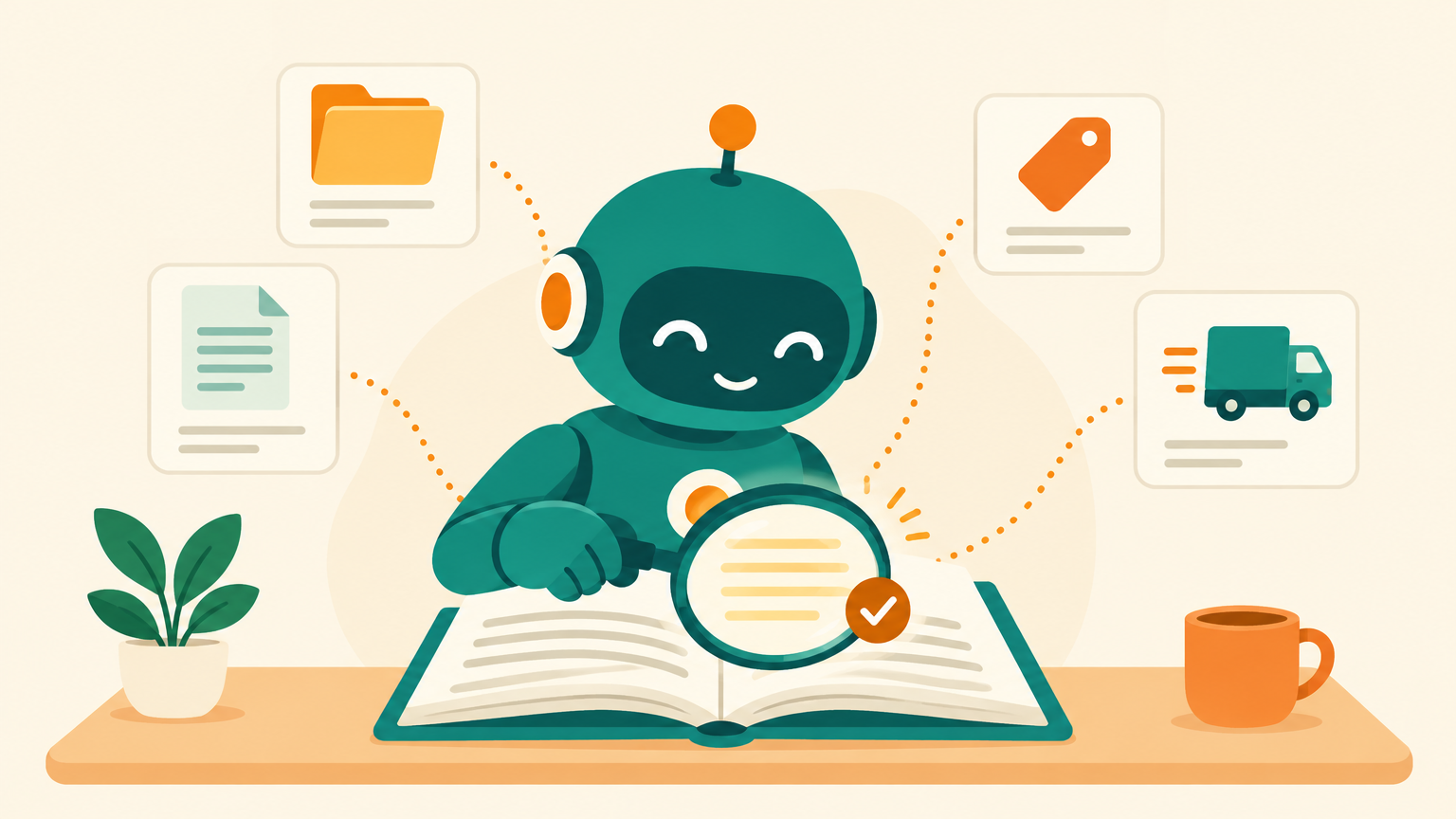
Ask a general AI model about your return policy and it will answer with confidence. The answer will sound right, read well, and have nothing to do with your actual policy. The model learned from the public internet. It has never seen your price list, your delivery areas or the exceptions your team makes every day. Retrieval-augmented generation, usually shortened to RAG, is how you make an AI agent answer from your business knowledge instead of from a good guess.
This guide is for business owners, consultants and teams who run, or plan to run, an AI agent that talks to customers or staff. You will get RAG in plain English, a simple rule for where each fact belongs, how to prepare knowledge files the agent can actually use, where to build it (PayMeGPT for full agents, Botcake AI for simple RAG, with real screens), a test plan with acceptance criteria, and how to keep it all current.
What you will get
- What RAG is and why it beats pasting everything into the prompt.
- The one-fact, one-home rule: instructions, knowledge files or live tools.
- A copy-ready knowledge file template.
- Why I recommend PayMeGPT, and the Botcake AI setup for simple RAG.
- How we build these agents together with Claude and PayMeGPT.
- A retrieval test with acceptance criteria and a monthly upkeep routine.
1. Why agents make things up
A language model is trained to produce the most likely next words. When it knows the answer, likely and correct are the same thing. When it does not, likely still sounds correct. That is why a model with no access to your business will invent a delivery fee, a store hour or a warranty term rather than say “I do not know”.
So why does this matter? Because in a customer conversation, a confident wrong answer is worse than no answer. The customer acts on it, your team has to correct it, and trust drops on both sides.
RAG fixes the cause instead of the symptom. The research paper that named it, by Patrick Lewis and colleagues in 2020, described models that combine what the model learned in training with a searchable store of documents it can look things up in. For a business, that store is your own knowledge.
2. How RAG works in plain English
Think of an open-book exam. Without RAG, the agent answers from memory. With RAG, it first looks up the right pages in your book, then answers using those pages.
Two things follow from this picture. First, the agent can only be as right as the passage it finds, so the search step matters as much as the model. Second, you do not need a bigger model to fix most wrong answers. You need better files and a better search.
Why not paste everything into the prompt? For a small business with one page of facts, that can work. As the knowledge grows, it stops working well. Research by Nelson Liu and colleagues in 2023 found that models use information at the start and end of a long input best, and perform noticeably worse when the relevant part sits in the middle. A focused search that hands the model the three right passages beats a wall of text.
3. Where each fact belongs
Most knowledge problems are not search problems. They are filing problems: the same price lives in the instructions, in two files and in an old website page, and they disagree. Decide where each fact lives by how often it changes.
| Where | Put here | Do not put here |
|---|---|---|
| Instructions | Role, tone, rules, what to never say, when to hand off | Prices, stock, long policy text |
| Knowledge files | Policies, FAQs, product and service details, price lists with a date | Anything that changes during the day |
| Live tools | Stock, bookings, order status, customer account data | Static policies that never change |
Live data is a different job: connect the system itself through an integration or MCP. See how to build an AI agent that uses your business tools with MCP.
4. Prepare knowledge the agent can use
A search system does not read your files the way a person does. It splits them into small passages and finds the passages closest to the question. A passage that only makes sense next to the paragraph before it will often be found without its context, or not found at all.
Research on this exact problem backs the point. Anthropic reported in September 2024 that adding a short piece of context to each passage before indexing cut failed retrievals by about 35%, about 49% when combined with keyword search, and about 67% when the results were also reranked. You do not need to build that pipeline to use the lesson: write every section so it stands on its own.
- One topic per file. “Delivery and shipping”, “Returns and refunds”, “Product: Model X”. Not “Everything 2026 final v3”.
- Headings shaped like questions. Customers ask questions, so the search matches question-shaped headings better.
- Repeat the subject. Write “Delivery to Cebu takes 3 to 5 days”, not “It takes 3 to 5 days”.
- Date your numbers. Every price and fee gets “as of” and a date.
- Say what you do not do. “We do not deliver outside the Philippines” prevents a whole class of invented answers.
A template you can copy for each knowledge file (every detail below is an illustrative example):
FILE: Delivery and shipping
OWNER: [Name]    LAST UPDATED: [Date]

## Do you deliver to [area]?
Yes. We deliver to [areas]. We do not deliver to [areas].

## How long does delivery take to [area]?
Delivery to Metro Manila takes [X] business days.
Delivery to provinces takes [X] to [Y] business days.

## How much is the delivery fee? (as of [Date])
Delivery to Metro Manila costs [amount].
Orders above [amount] get free delivery.

## What if my order is late?
If an order is more than [X] days late, the agent hands
the customer to a person on the team.

## What we do NOT promise
We do not promise same-day delivery.
5. Where I recommend building it: PayMeGPT
For a full knowledge-grounded agent, my recommendation is PayMeGPT. It keeps the three homes from section 3 in one place: instructions, knowledge files and live tools.
- Knowledge files. Each agent takes PDF, TXT, MD, HTML, JSON, CSV and spreadsheet files (XLSX and XLS are converted to searchable text), up to 50 MB per file and 25 files per agent. Files index in the background, so check that indexing has finished before you test.
- Instructions from a live Google Doc. The agent's instructions can come from a Google Doc, so the owner of the doc updates the agent by editing it. Guardrails are stored separately, so they stay in force when the instructions change.
- Live tools for live data. AI Functions can read and update rows in a Google Sheet, which is the simplest way to give an agent stock, availability or order status without putting it in a file.
- Built with Claude through MCP. PayMeGPT connects to Claude or ChatGPT as an MCP server, so you can create the agent, attach its knowledge files and test it from a chat.
The PayMeGPT YouTube channel has the build tutorials. For reference, check the channel here and the changelog here.
When you need simple RAG inside a Facebook Messenger and Pancake setup, Botcake AI is the easy option, shown next. Chatrace and ChatbotBuilder AI are alternatives for chatbot-first builds; ChatbotBuilder AI's knowledge base builder takes files, website links and YouTube transcripts. For reference, check its changelog here.
6. Simple RAG: set it up in Botcake AI
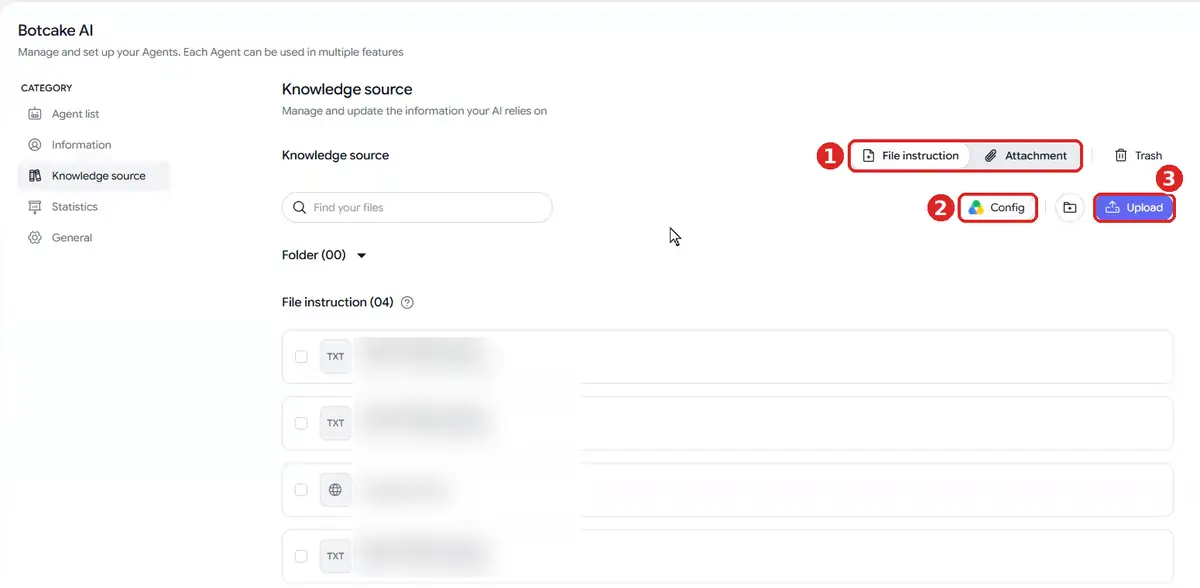
Botcake AI keeps knowledge in a shared library, then lets each agent use the files it needs. The setup from Botcake's left menu, under Botcake AI:
1Open the Knowledge source library. It has two views: File instruction for documents and Attachment for images the agent can send. Use Upload for files or Config to pick files from Google Drive.
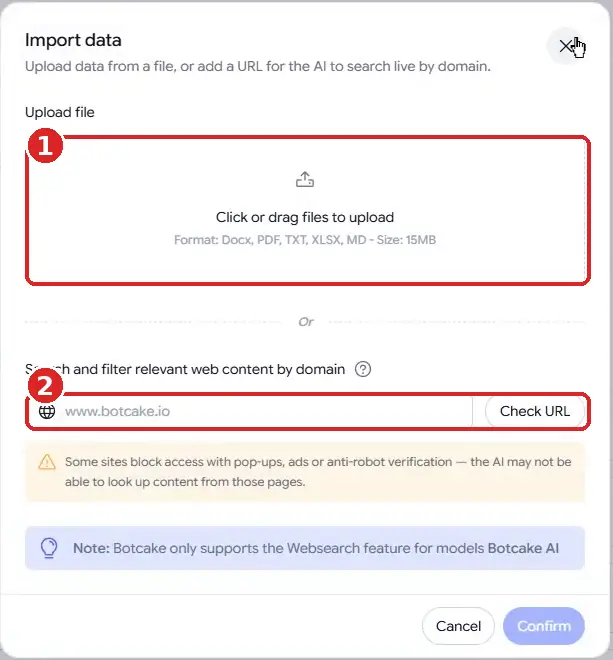
2Upload your files or add a website. Upload opens Import data. You can add Docx, PDF, TXT, XLSX or MD files up to 15 MB, or enter a website domain and click Check URL so the AI searches that site live each time it answers. Live web search only works with Botcake AI models, and sites with pop-ups or anti-robot checks may block it.
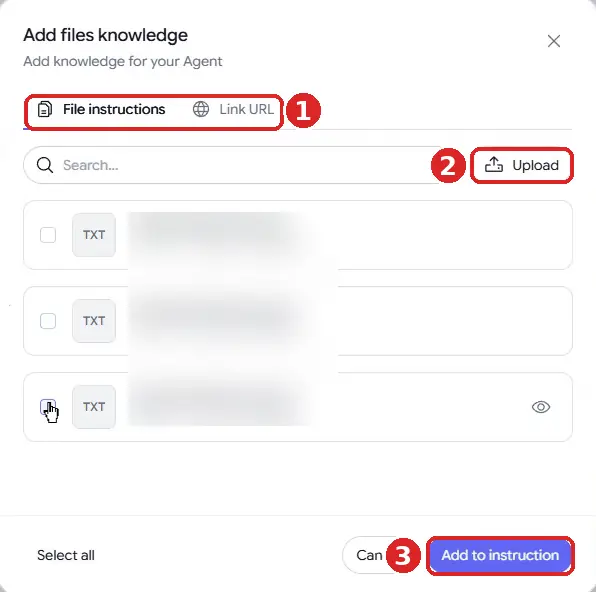
3Attach the files to the agent. Open the agent, go to the Knowledge tab, click Add files, tick the files or links from the library, and click Add to instruction. Give each agent only the files its job needs.
4Test in Preview before you go live. Ask the questions from your test set in the agent's Preview and compare every answer with the file it should come from.
For reference, check the documentation here. For the full agent setup, including instructions and handoff, see the Botcake AI + Pancake setup guide.
7. Test the retrieval
If you cannot test it, do not ship it. Build a test set of 30 real questions, taken from your inbox, not invented by you: 20 your files answer, 5 your files do not answer, and 5 tricky ones (two products with similar names, a policy with an exception, a question in a different order of words).
Acceptance criteria before the agent goes live:
- Grounded accuracy: at least 19 of the 20 answerable questions are correct and match the file they should come from.
- Honest gaps: all 5 unanswerable questions get “I do not have that information” plus a handoff, with zero invented answers.
- No contradictions: the tricky questions return the right product or exception, not a blend of two.
- Freshness: change one price in a file, re-run the price questions, and confirm the agent uses the new price.
After launch, the metric to watch is the share of conversations where a person had to correct the agent, tracked weekly. If it rises, look at the files first, not the model. The full method is in how to test an AI chatbot before it talks to your customers.
An honest limitation: RAG reduces invented answers, but it does not remove them. The search can return the wrong passage, and the model can still misread the right one. That is why the test set includes questions your files do not answer, and why every customer-facing agent needs a clear handoff to a human.
8. Keep it current
Knowledge goes stale quietly. Nobody announces that a delivery fee changed; the agent just starts being wrong. A simple monthly routine prevents most of it:
- Review every file with an owner. Update the date even when nothing changed, so you know it was checked.
- Read the unanswered questions. Every “I do not have that information” is a candidate for a new entry.
- Re-run the test set after any change to files, instructions or the model.
- Remove before you add. Delete the old file when you upload a new version, so two versions never compete.
9. How we build knowledge-grounded agents with Claude and PayMeGPT
For years I have built AI agents grounded in a real knowledge base, for my own business and for clients. Today the build runs the same way every time, with Claude doing the work through PayMeGPT's MCP connection and me owning the rules:
1Collect the real questions. Pull the questions customers actually ask from the inbox and sort them into the three homes: instructions, knowledge files or live tools.
2Claude drafts the knowledge files. One topic per file, question-shaped headings, dated prices, using the template above. A person who owns each topic reviews it.
3Claude builds the agent in PayMeGPT. Through MCP it creates the agent, sets the guardrails, points the instructions at a Google Doc, and attaches the knowledge files.
4Claude waits for indexing, then tests. It runs the 30-question test set from section 7 and reports every answer that does not match its file.
5Fix the file, not the model. Each failure becomes an edit to one file or one line of instructions, and the test runs again.
This publication runs on the same principle. It is designed and run with AI agents under my own architecture, and its memory lives in a GitHub repository: the runbook, the voice rules and the content rules are files Claude reads before every run. When something needs to change, I change one file in one place, and every later run picks it up. For the full week-by-week walkthrough, see how we build with Claude and PayMeGPT.
Frequently asked questions
What is RAG in simple terms?
RAG, or retrieval-augmented generation, means the AI first searches your own documents for the passages that answer a question, then writes its reply using those passages. It is like an open-book exam for the AI.
Do I need RAG if my business is small?
If all your facts fit on one or two pages, putting them directly in the instructions can be enough. Once you have several policies, products or price lists, knowledge files with retrieval give more accurate answers and are easier to keep up to date.
What file format works best for an AI knowledge base?
Plain, well-structured text works best: one topic per file, question-shaped headings and short self-contained answers. Botcake AI accepts Docx, PDF, TXT, XLSX and MD files up to 15 MB.
What is the best platform for RAG?
My recommendation is PayMeGPT for a full agent: knowledge files, instructions from a live Google Doc, live data through Google Sheets, and building through Claude with MCP. For simple RAG inside Messenger and Pancake, Botcake AI is the easy option.
Is RAG the same as training or fine-tuning a model?
No. RAG does not change the model. It gives the model your documents to look up at the moment it answers, so you can update the knowledge by editing a file.
Ground your agent in your own knowledge
Build a full knowledge-grounded agent on PayMeGPT. For simple RAG in Messenger, build it in Botcake and run the conversations in Pancake. Use coupon CHAMP20 for 20% off all Pancake plans plus 30 days free (new Pancake customers or a new billing account only). The Botcake and Pancake links are affiliate links.
Want your knowledge base and agent designed and tested for you? Book a free AI Automation Blueprint call.
References
- Lewis et al.: Retrieval-Augmented Generation for Knowledge-Intensive NLP Tasks, NeurIPS 2020. Accessed October 2026.
- Liu et al.: Lost in the Middle: How Language Models Use Long Contexts, 2023. Accessed October 2026.
- Maginative: Anthropic's Contextual Retrieval technique, September 2024 (reported figures for failed-retrieval reduction). Accessed October 2026.
- PayMeGPT YouTube channel (build tutorials, including MCP with ChatGPT and Claude). Accessed October 2026.
- ChatbotBuilder AI changelog (Knowledge Base Builder updates; latest entry seen February 14, 2026). Accessed October 2026.
- Botcake documentation: Overview of Botcake AI. Accessed October 2026.
- Botcake AI + Pancake Setup Guide, Dijae Dadula, October 2026.
Keep reading
Get one practical idea like this every week
Join the free newsletter on AI agents, automation and turning your skills into income. Prefer video? Watch the walkthroughs on YouTube.
Want a system like this built for your business? Book a free AI Automation Blueprint call, or see the done-for-you services at my consultancy, IRD Digital Marketing Services.
DIJAE DADULA
Dijae Dadula · AI automation and systems specialist · Cavite, Philippines · Founder of IRD Digital Marketing Services
Home · Blog · Book a call · Newsletter · YouTube · Threads · Transparency
Some links on this site are affiliate links. If you buy through them, I may earn a commission at no extra cost to you.
© 2026 Dijae Dadula. All rights reserved.
